
- Home /
- Remotes /
- Garage & Gate Remotes /
- Conqueror 4 Button Remote for Force Motor (Original)
Products
- Access Control
- Automotive Locks & Keys
- Cash Box / Storage
- Clearance Items
- Door Hardware
- Electric Locks
- Electronic Digital Locks
- Electronic Smart Locks
- Fire & Safety
- Key Management
- Keys
-
Locks
- Anchors
- Camlock
- Cavity Slider Locks
- Commercial Digital Locks
- Commercial Knobsets/leversets
- Commercial Mortice Lock Accessories
- Commercial Mortice Locks
- Cupboard / Cabinet Locks
- Deadbolts
- Deadlatches / Deadlocks
- Digital Mechanical Locks
- Garage Door Locks
- Gate Locks
- Latch Bolts
- Lock Cylinder
- Locking Bolts
- Nightlatches
- Ranchslider Locks
- Rebate Kits
- Residential Knobsets/leversets
- Residential Mortice Locks
- Rim Locks
- Security Screen Door Lock
- Speciality Locks
- Strike Plates
- Window Locks & Stays
- Padlocks
- Remotes
- Restricted Key Systems
- Safes
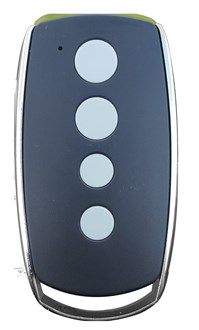
Conqueror 4 Button Remote for Force Motor (Original)
Stock Code:
510040
Price:
$103.50 (Incl. GST)
Description
CONQUEROR PROGRAMMING INSTRUCTIONS
For Force motors; 600N, 800N, 1000N, 1200N, Force-Matic, Force-Speed
Programming Transmitters
1. Press the "CODE" button. a Dot will be indicated in the corner of the display.
2. Now press the button on the hand transmitter you want to use, pause for 2 seconds, then press the same button on the hand transmitter again for 2 seconds
The Dot on the display will flash to confirm the code, then turn off.
Repeat the process for additional remotes that need to be stored.
NOTE: Hand transmitters that are supplied with the door opener are pre-programmed.
Deleting Transmitters
Press and hold the "CODE" button until a "C" is indicated on the display.
All stored remotes will be deleted.